Scores

play, transpose and view music scores with Scorch

Scorch
Twitter Facebook FriendFeed Blogspot Apple Discussions
AudioBoo YouTube GMail SoundCloud Last.fm
Delicious Linkedin Flickr Photobucket Digg!
Tumblr Evernote Prince.org Stumbleupon TwitPic
submit to reddit Version Tracker Picassa Google Maps eBay
Sibelius Music Notation TrailGuru ReverbNation Discogs Scribd
Wakoopa Xing Brightkite MacIdol MusicTeachers.co.uk
POSTEROUS SKRIBIT CLEARSPRING BERLIN PHILHARMONIKER CLUSTERSHOT
Identi.ca Google Wave School Of Everything WeFollow My Amazon Wish List
Kompoz Stage Jobs Pro Indaba Music Blip.fm MyOpenID
To use the Scorch pages, your computer's web browser will be directed to download the SCORCH PLUG-IN. This enables you to view the score while it plays the music on your computer and also print the scores. download Scorch
Valid XHTML 1.0 Transitional Valid CSS!
These Scores are made using Sibelius Music Notation software then saved as a web page which you can play using the FREE Scorch plug-in.

The web page displayed in your browser will have a score which you can play, transpose, change tempo (speed) and print. Use the Drop Down Navigator above, where it says, Select Scorch Page Here then press Go and your browser will load a Scorch page, or use the links in the Sidebar.

Here is an (small) example of Transit Of Venus 2 for flute duet, showing what the Scorch web page looks like:
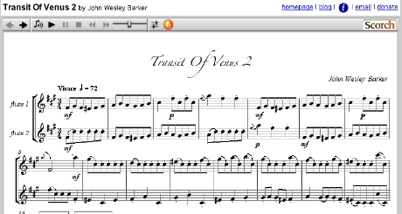
Transit Of Venus 2 Scorch page

Clicking on the example will also take you to the Scorch page.

Twitter Facebook FriendFeed Blogspot Apple Discussions
AudioBoo YouTube GMail SoundCloud Last.fm
Delicious Linkedin Flickr Photobucket Digg!
Tumblr Evernote Prince.org Stumbleupon TwitPic
submit to reddit Version Tracker Picassa Google Maps eBay
Sibelius Music Notation TrailGuru ReverbNation Discogs Scribd
Wakoopa Xing Brightkite MacIdol MusicTeachers.co.uk
POSTEROUS SKRIBIT CLEARSPRING BERLIN PHILHARMONIKER CLUSTERSHOT
Identi.ca Google Wave School Of Everything WeFollow My Amazon Wish List
Kompoz Stage Jobs Pro Indaba Music Blip.fm MyOpenID
To use the Scorch pages, your computer's web browser will be directed to download the SCORCH PLUG-IN. This enables you to view the score while it plays the music on your computer and also print the scores. download Scorch
Valid XHTML 1.0 Transitional Valid CSS!
© 2008 John Wesley Barker. All Rights Reserved.